App Banner
An App Banner is a notification strip or message that appears inside an application to show an important announcement, promote something (like a feature or update), or guide users — without disrupting their activity.
It allows users to create, manage, search, activate, and control in-app banners that appear inside the application.
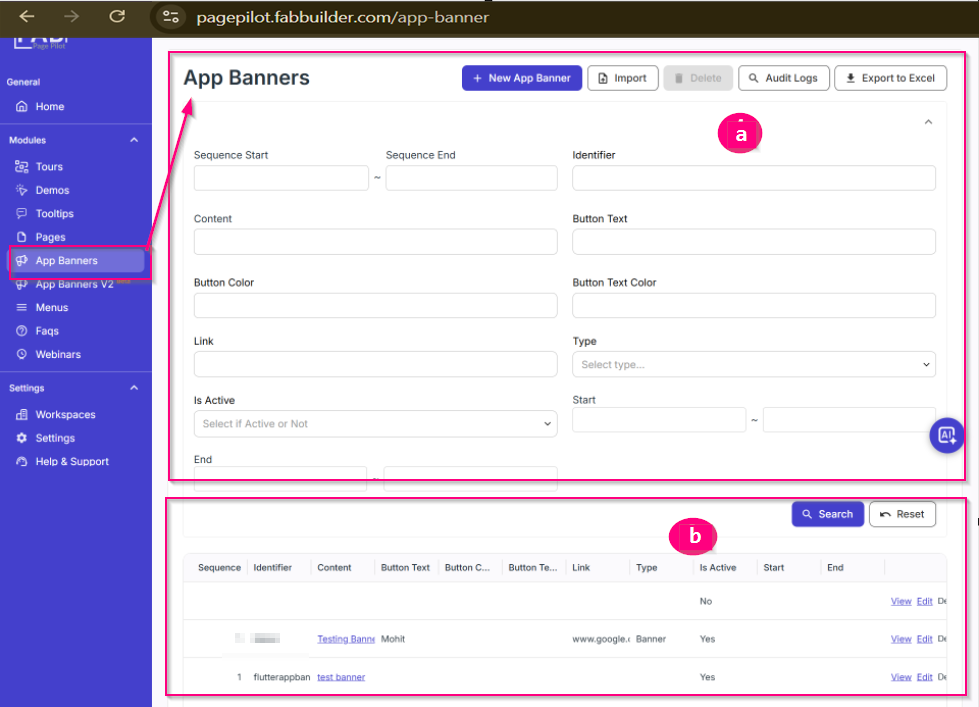
Screen- App Banner
App Banner Form Fields Description
Below are the details of the fields label (a) available in the App Banner creation form abd area b didplays app banner details added i area (a):
Sequence Start / End
Defines the display order of the banner within a sequence.
It determines when the banner should appear compared to other banners.
Identifier
A unique name assigned to the banner for internal reference and easy identification.
Content
The main message or text that will be displayed inside the banner.
Button Text
The label displayed on the banner button (e.g., “Learn More”, “Update Now”, “View Details”).
Button Color
Specifies the background color of the banner button.
Button Text Color
Defines the font color of the text displayed on the banner button.
Link
The URL to which the user will be redirected when the banner button is clicked.
Type
Specifies the category or type of the banner (e.g., informational, promotional, announcement).
Is Active
Determines whether the banner is enabled or disabled.
- Yes – Banner will be displayed
- No – Banner will not be displayed
Start / End Date
Defines the time period during which the banner will be visible to users.