Page Types Guide: Create, View, and Manage Page Categories
The Page Types screen is used to define different types of pages and their associated metadata, helping FAB Page Pilot target and manage content more accurately across your application
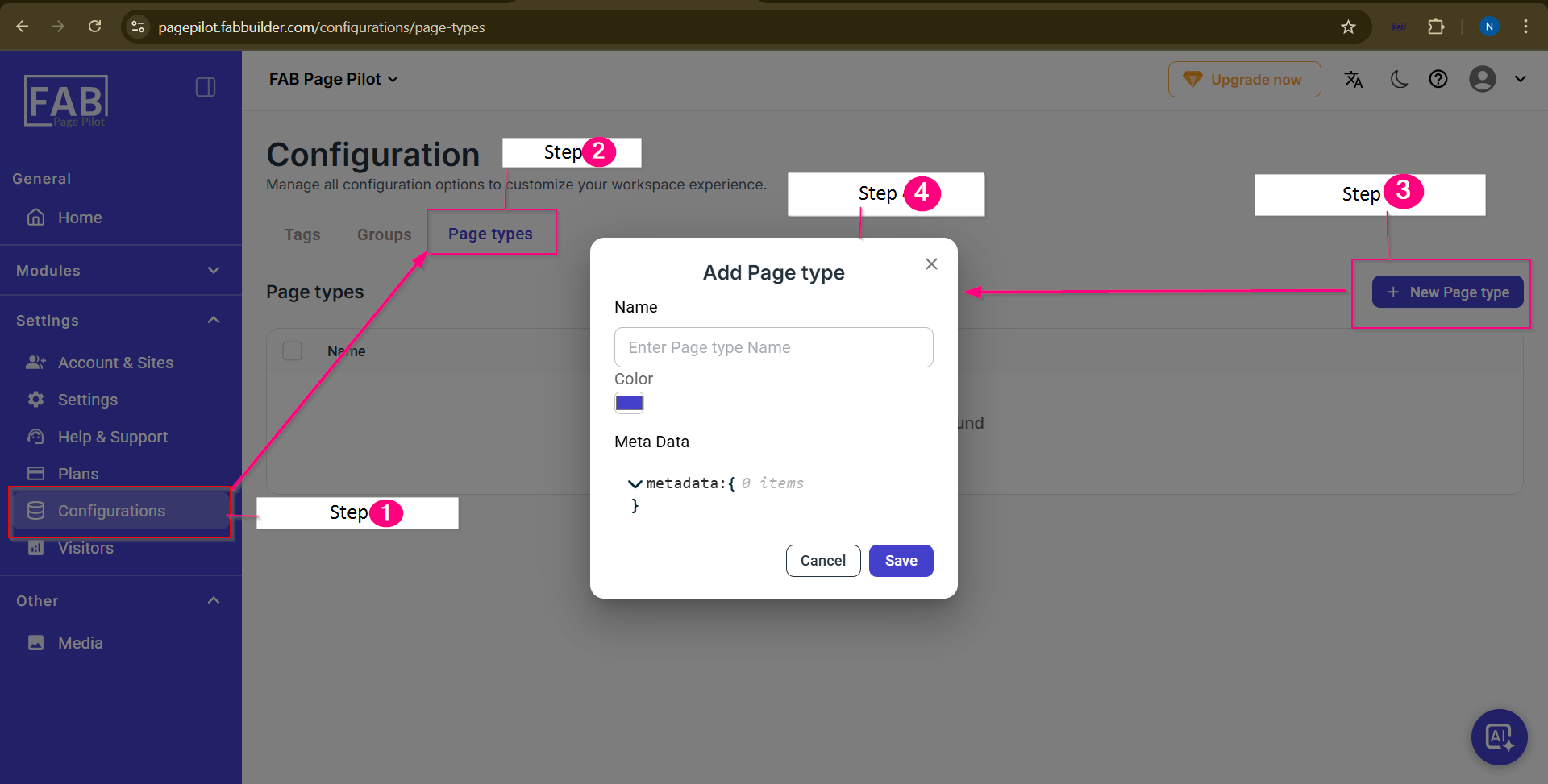
Screen- Page Type
Step-by-Step Explanation
Step 1: Open Configurations
From the left sidebar, navigate to Settings → Configurations.
This opens the configuration management area.
Step 2: Select Page Types Tab
Click the Page types tab on the Configuration page.
This displays the list of existing page types.
Step 3: Add a New Page Type
Click the + New Page type button on the top-right corner.
The Add Page type dialog opens.
Step 4: Create Page Type
In the Add Page type popup, enter:
- Name: A descriptive name for the page type.
- Color: Select a color for visual identification.
- Meta Data: Define metadata keys used to identify or target pages.
Click Save to create the page type or Cancel to discard changes.