Manage FAQ GroupsOverviewTheManage FAQ Groupsscreen allows users to create, organize, and manage FAQ groups within the selected workspace. Each FAQ group can contain multiple frequently asked questions and answers that can be published to the integrated website. Users can also filter FAQ groups by website, language, and device to manage content efficiently. 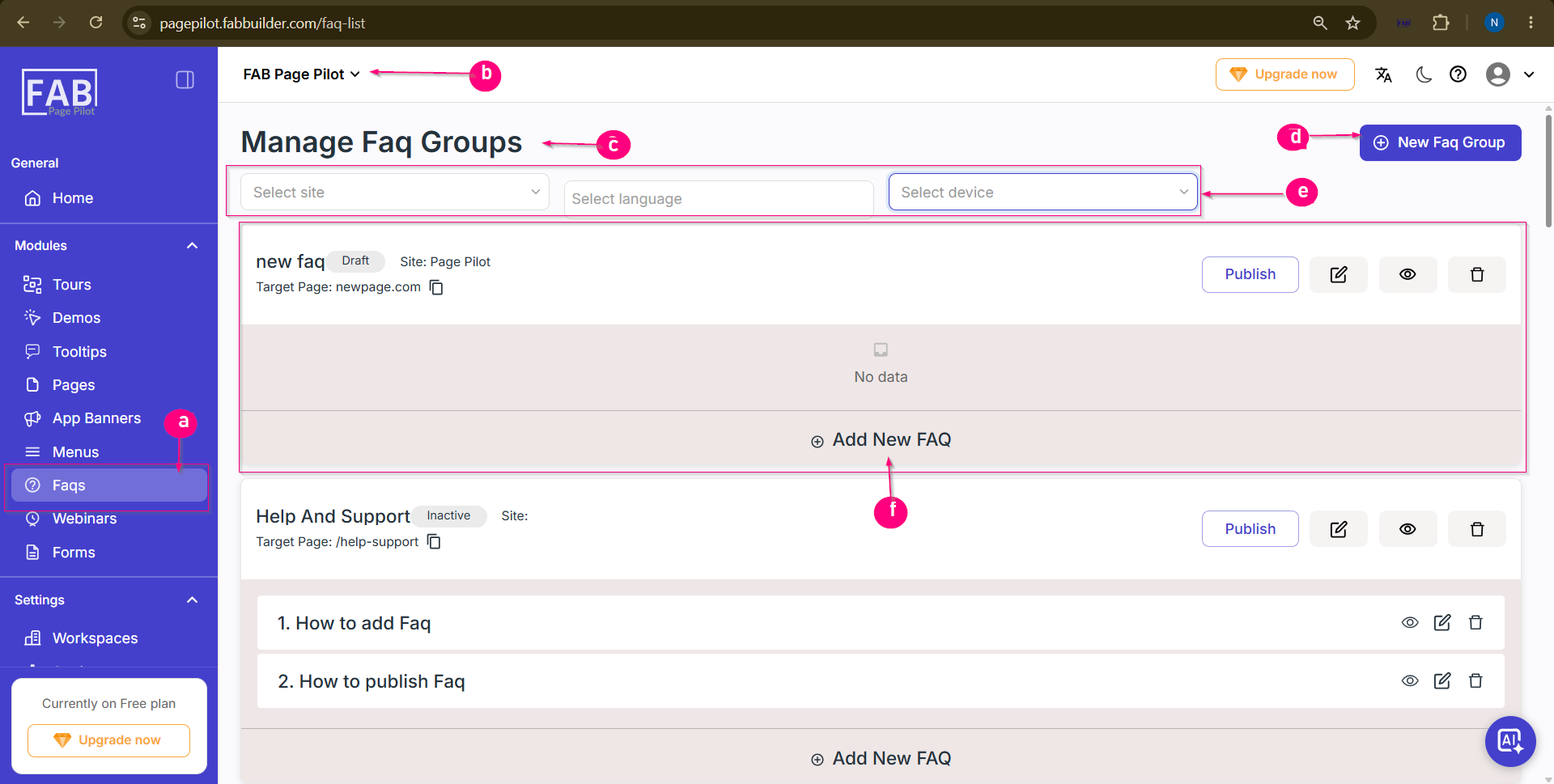
Screen Componentsa. FAQsProvides access to theFAQsmodule, where users can create, manage, and publish FAQ groups. b. Workspace SelectorDisplays the currently selected workspace. Users can switch to another workspace using the drop-down list. c. Manage FAQ GroupsDisplays the list of all FAQ groups created in the selected workspace, including their status, target page, and associated website. d. New FAQ GroupAllows users to create a new FAQ group by entering the required details. e. Filter OptionsAllows users to filter FAQ groups based on the following criteria:
f. Add New FAQAllows users to add a new question and answer to the selected FAQ group. Each FAQ can be managed individually using the available actions:
PurposeTheManage FAQ Groupsscreen serves as the central location for organizing and maintaining FAQ content. It enables users to create FAQ groups, manage individual FAQs, apply filters, and publish content to the integrated website.
|