FAQ Group content creator Screen
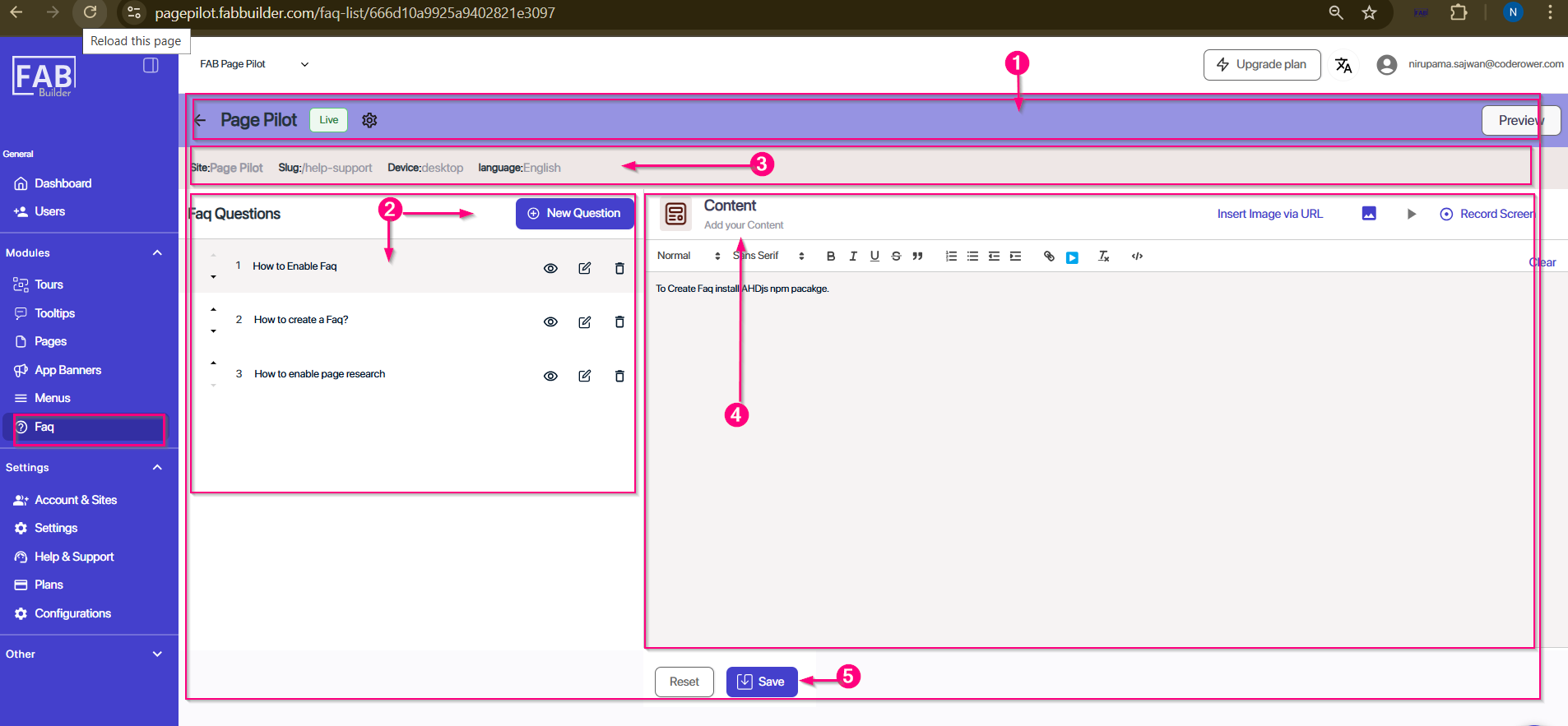
This screen allows users to add, edit, and manage individual FAQs inside a selected FAQ Group.
1.FAQ Group Header-Displays the group name (e.g., Page Pilot) with its status (Draft/Published). Setting button allows user to add details such as Site, Slug, Device, and Language can be edited by clicking on it. The Preview button is located to preview FAQ group before publishing it.
2. FAQ Questions Panel (Middle)- Lists all questions added under the FAQ group.
Options include:
- Add a new FAQ question.
- View, edit, or delete existing questions.
3. Details Panel-This area contains the details of FAQ group such as site, slug, device and language.
4. Content creator area -This allows user to create the content of FAQ answer is written. This area supports text formatting, inserting images via URL, and recording screen content.
5. Action Buttons (Footer Area)-
- Reset – Clear changes and reset content.
- Save – Save the FAQ details after creating it on content area.
Screen – Add FAQ Content