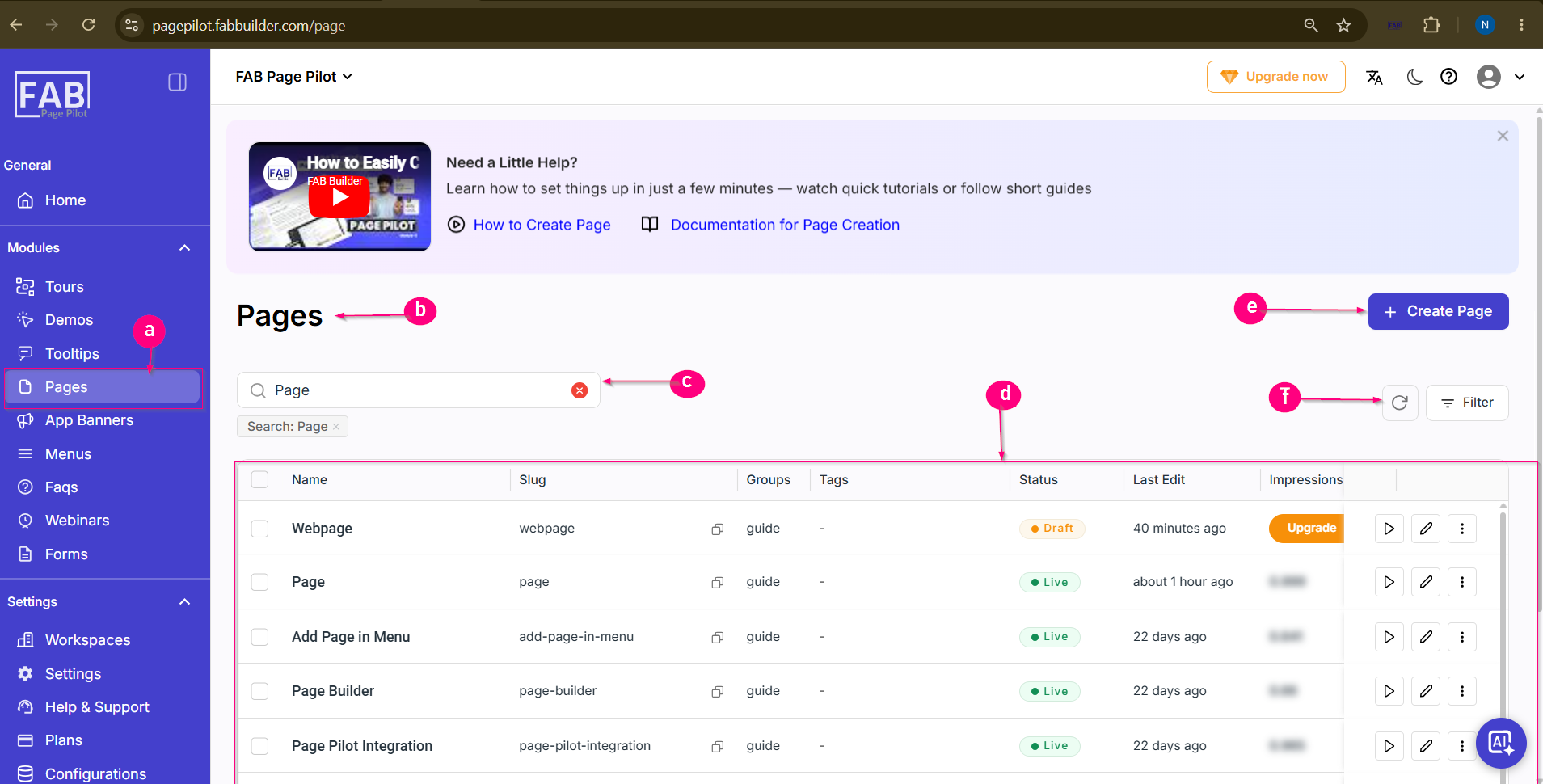
Pages Screen
Purpose
The Pages screen allows users to create, manage, and publish pages within Page Pilot. Published pages can be displayed on the integrated website, helping users provide guides, documentation, announcements, and other informational content to visitors.
Screen Components
a. Pages Module
Access the Pages section to view and manage all created pages.
b. Pages Heading
Displays the current module being accessed.
c. Search Bar
Search for pages by name or keyword to quickly locate specific pages.
d. Page Listing
Displays all created pages along with details such as:Name,Slug,Group,Tags,Status,Last Edit,Impressions
Status Indicator– Shows whether a page is in Draft or Live status.
Page Actions– Preview, edit, or access additional page management options.
Impressions– Displays the number of page views.
e. Create Page Button
Opens the page creation process to add a new page.
f. Refresh & Filter
Refresh the page list and apply filters to narrow down the displayed results.
Use Case
An organization creates a Help Guide page in Page Pilot and publishes it. Once the Page Pilot script is integrated with the website, visitors can access the page to view onboarding instructions, product documentation, or support information.