Webinar ModuleOverviewThePage Pilot Webinarmodule allows users to create, manage, schedule, and publish webinars within the application. It is primarily designed forpre-recorded (automated) webinars, where users can upload videos, configure schedules, and share webinar experiences with their audience. Webinars can be used for:
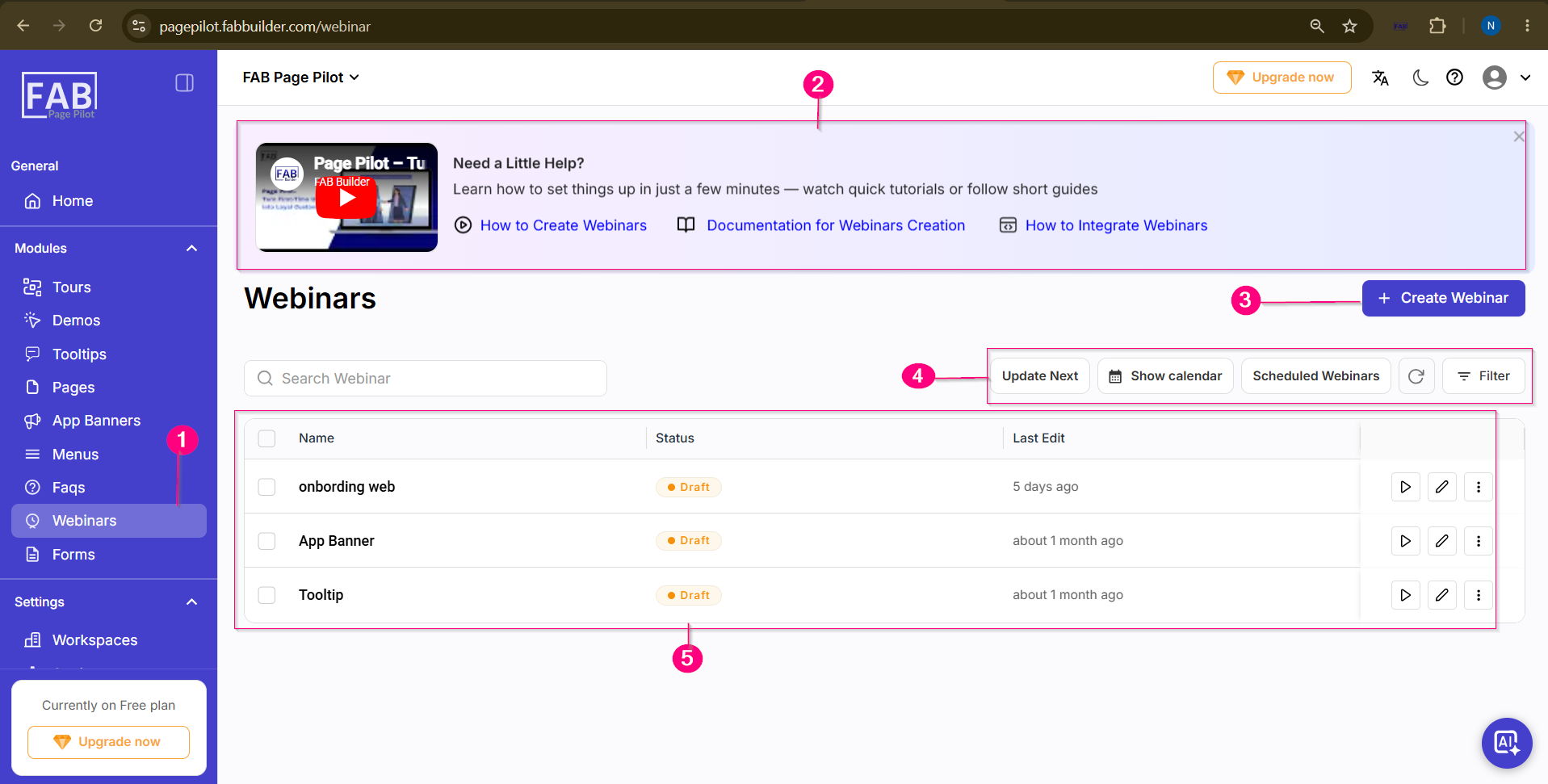
The Webinar Listing screen displays all created webinars and provides options to create, manage, schedule, and organize webinars.
Screen Components
1. Webinar Module
Located in the left navigation panel.
Click Webinars to open the Webinar management screen.
2. Help & Learning Section
Displayed at the top of the page.
Provides quick learning resources including:
3. Create Webinar
Click + Create Webinar to create a new webinar.
This opens the webinar creation wizard where users can configure webinar details.
4. Webinar Management Options
The toolbar provides the following options:
5. Webinar List
Displays all available webinars.
Each webinar entry includes:
Key Capabilities
The Webinar module enables users to:
How It Works
Once published, users can:
|